
Step-by-step guide
How to analyze an IPA file
To analyze an IPA file, unzip it and read its Info.plist, entitlements and linked libraries. Do it by hand in Terminal, or drop it on fr0stbyte for the full report.
The manual method
Analyze an IPA in Terminal
An .ipa is a zip archive with the app bundle inside a Payload folder. Five commands read the parts that matter most.
unzip -q MyApp.ipa -d MyAppUnpacks the archive. Run
ls MyApp/Payloadto see the bundle's real name.plutil -p MyApp/Payload/MyApp.app/Info.plistPrints the bundle ID, version, minimum iOS and every permission string.
codesign -d --entitlements :- MyApp/Payload/MyApp.appLists the entitlements stored in the code signature.
otool -L MyApp/Payload/MyApp.app/MyAppLists every framework and library the main executable links.
otool -l MyApp/Payload/MyApp.app/MyApp | grep -A4 LC_ENCRYPTION_INFOShows
cryptid 1when the executable is FairPlay-encrypted.
The executable's name comes from CFBundleExecutable in Info.plist, so swap it in for the last MyApp.
unzip, plutil and codesign ship with macOS. otool comes with the Xcode command-line tools.
Each command answers one question, and sizes, assets and the tech stack take many more. fr0stbyte runs these reads and the rest from one drag and drop. Here is what stays readable in an encrypted IPA.
Quick look in your browser: free IPA analyzer.
How it works
Or drop it on fr0stbyte
- 01
Drop the IPA
Drag an .ipa onto fr0stbyte. It unpacks the Payload/*.app bundle into a temporary folder and starts reading.
- 02
Read the General tab
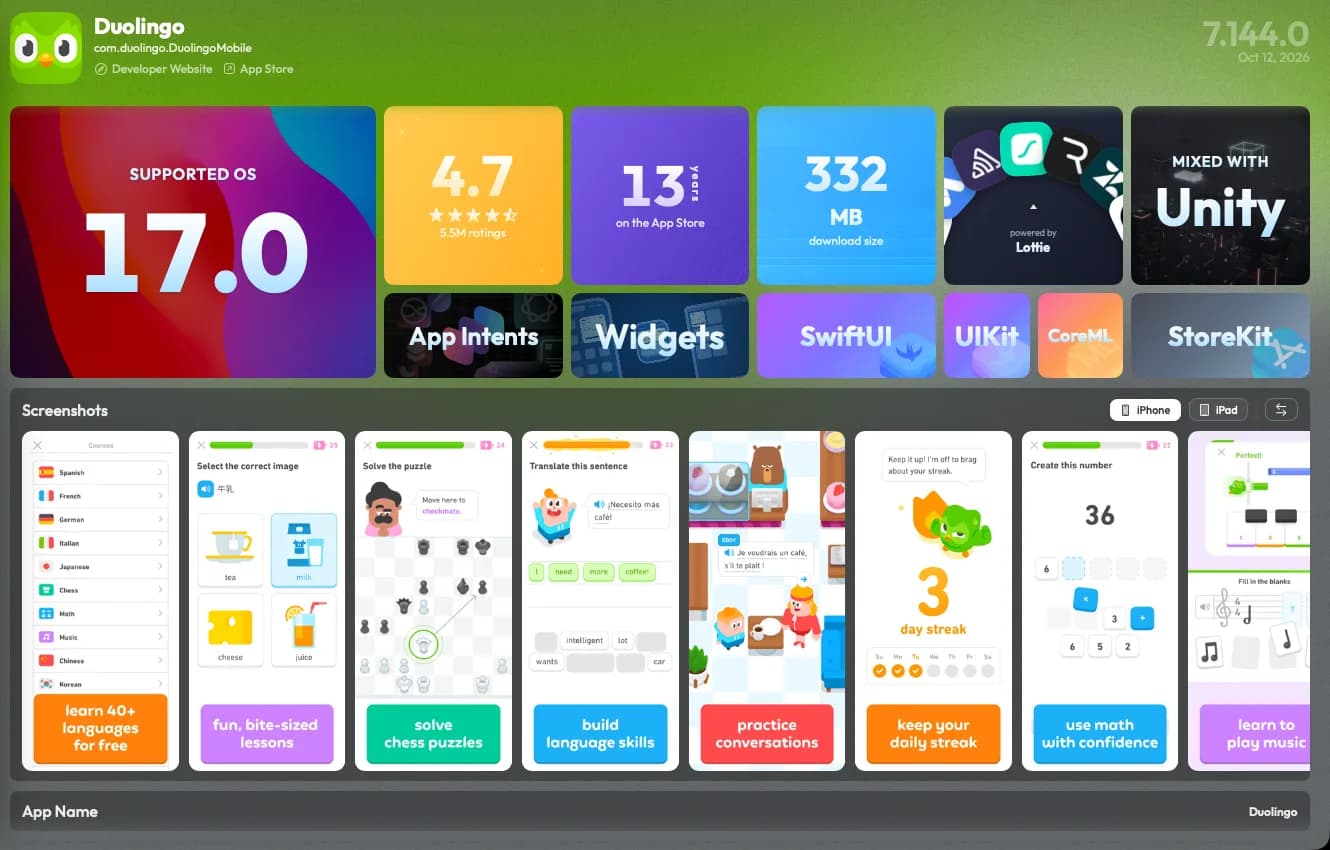
Icon, version, bundle ID, minimum iOS, download and installed size, App Store rating and the detected stack, on one screen.
- 03
Dig into any tab
Frameworks, Plugins, Info, Signing, Images, Animations, Audios, Fonts, Strings, Nibs: 12+ tabs, each a full inspector.
What you get
Read the stack, size and signing
Stack detection with versions
React Native, Flutter, Unity, Capacitor, SwiftUI, UIKit and the package managers behind them, read from the binary with exact versions.
Every framework and SDK
Dynamic and static frameworks, third-party SDKs, ad networks and SKAdNetwork IDs, each with size, version and source link.
Entitlements and signing
Entitlements, provisioning, code-signing identity, FairPlay status and bundle integrity, laid out as rows you can search.
Size per device
IPA, payload and installed size for 21+ device models, a composition tree map and download-size history across releases.
Assets, fonts, strings
Decoded asset catalogs, Lottie and Rive animations, audio, fonts and every localized string, each in its own viewer.
Info.plist, explained
Every key with a plain-English description, Sensitive and Deprecated flags and the SKAdNetwork grid. Export formatted or raw.
A PDF when you need one
Five report profiles, from a one-page summary to a full technical report, in two styles.
Honest limits
What it does not do
fr0stbyte reads, it never modifies. App Store executables stay FairPlay-protected, so the main binary's code and class names are out of reach. Frameworks, resources, plists, entitlements and the signature are not. It is not a decompiler and generates no source. Analysis takes an .ipa or .fbt, not a bare .app.
FAQ
IPA analysis FAQ
- How do I analyze an IPA file on a Mac?
- Unzip it, then read Info.plist with plutil, entitlements with codesign and linked libraries with otool. Or drag it onto fr0stbyte, which shows all of that and more in seconds.
- Which tools do I need to analyze an IPA by hand?
- Terminal on a Mac. unzip, plutil and codesign ship with macOS, and otool comes with the Xcode command-line tools.
- Can I analyze an IPA in my browser?
- Yes. The free IPA analyzer on fr0stbyte.app reads Info.plist, entitlements, frameworks and size in your browser. The file is never uploaded.
- Can it analyze an App Store IPA?
- Yes. Frameworks, resources, plists, entitlements and the signature all sit outside the FairPlay-encrypted code. Only the compiled code itself stays unreadable.
- Does the IPA leave my Mac?
- No. fr0stbyte unzips it into a temporary folder on your Mac, and the analysis runs there, read-only.
- Can I analyze an app I do not have the IPA for?
- Yes. Sign in with your Apple ID, search the App Store inside fr0stbyte and download any version. 1 credit per MB.
More to do with the same file
Other ways to read an IPA
Or start at the IPA analyzer for macOS, where every one of these begins with a drag and drop.
One drop, every answer.
Drag in an IPA. Read what it is built with, what it weighs and what it may do.